Overview
Features and highlights
Pro-level proposals: Build your own proposal or import electrical or mechanical estimates with cost types and project phase breakdowns.
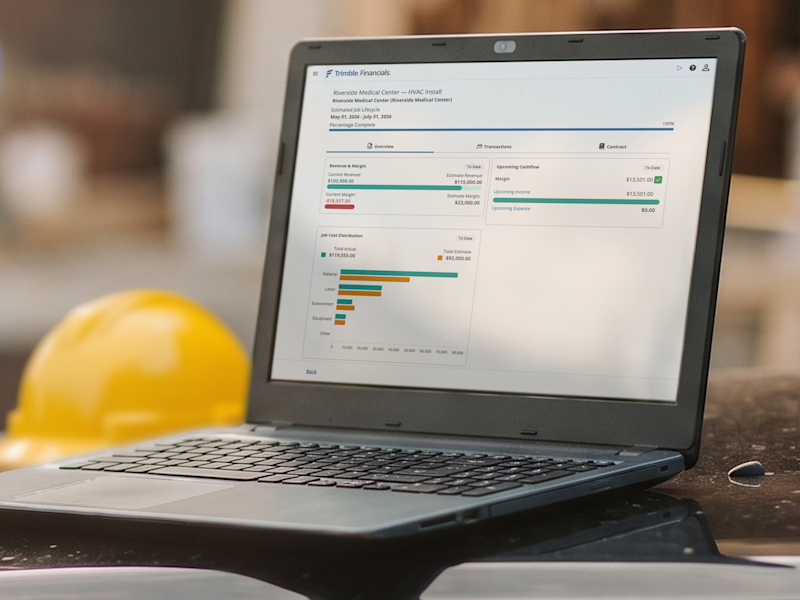
Total job cost visibility: Tag expenses to jobs, phases and cost types, and see committed vs. actual costs, so you always know where you stand.
Simple billing: Easily generate invoices and get paid faster. Automatically calculate your taxes based on the project zip code and services provided.
Painless reporting: Instantly create financial reports for your bookkeeper, CPA or bank and get a real-time view of your company’s financial position.
Built for AI: Trimble Financials Go was built to use Trimble's AI Platform.
Technical specifications
Trimble Financials Go is a mobile optimized website compatible with:
Browsers:
Google Chrome
Microsoft Edge
Apple Safari
Operating Systems:
Windows 10 and later
macOS Monterey and later
Devices:
iOS (iPhone, iPad) using Safari and Chrome
Android devices using Chrome
Pricing and plans
Annual subscription with auto-renewal: $1,188 USD/year
What's included
Unlimited jobs, vendors, customers, expenses and invoices.
Mobile, tablet and desktop browser versions.
24/5 technical support via email and the Trimble Support Portal.
Help documentation in the Trimble portal and AI help agent.
How it works
Purchase: Select your plan and complete the checkout process.
Activate: Once your order is confirmed, log in to the Trimble Admin Console using your Trimble ID (TID).
Assign licenses: Use the console to assign licenses to yourself and/or your team members.
Launch: Follow the setup link in your confirmation email to access Trimble Financials.
Complete your profile: Log into Trimble Financials to add your company details, including company name and type, EIN/SSN, address, phone and contact email.
Configure Avalara for taxes: You'll only need your address again— all future tax setup will be based on job location.
Run your jobs: Start creating proposals, projects, customers and vendors.
Overview
Features and highlights
Pro-level proposals: Build your own proposal or import electrical or mechanical estimates with cost types and project phase breakdowns.
Total job cost visibility: Tag expenses to jobs, phases and cost types, and see committed vs. actual costs, so you always know where you stand.
Simple billing: Easily generate invoices and get paid faster. Automatically calculate your taxes based on the project zip code and services provided.
Painless reporting: Instantly create financial reports for your bookkeeper, CPA or bank and get a real-time view of your company’s financial position.
Built for AI: Trimble Financials Go was built to use Trimble's AI Platform.
Technical specifications
Trimble Financials Go is a mobile optimized website compatible with:
Browsers:
Google Chrome
Microsoft Edge
Apple Safari
Operating Systems:
Windows 10 and later
macOS Monterey and later
Devices:
iOS (iPhone, iPad) using Safari and Chrome
Android devices using Chrome
Pricing and plans
Annual subscription with auto-renewal: $1,188 USD/year
What's included
Unlimited jobs, vendors, customers, expenses and invoices.
Mobile, tablet and desktop browser versions.
24/5 technical support via email and the Trimble Support Portal.
Help documentation in the Trimble portal and AI help agent.
How it works
Purchase: Select your plan and complete the checkout process.
Activate: Once your order is confirmed, log in to the Trimble Admin Console using your Trimble ID (TID).
Assign licenses: Use the console to assign licenses to yourself and/or your team members.
Launch: Follow the setup link in your confirmation email to access Trimble Financials.
Complete your profile: Log into Trimble Financials to add your company details, including company name and type, EIN/SSN, address, phone and contact email.
Configure Avalara for taxes: You'll only need your address again— all future tax setup will be based on job location.
Run your jobs: Start creating proposals, projects, customers and vendors.
Attention
Please get in touch with your account owner for assistance. If you wish to make a purchase, we recommend signing out and creating a personal account.